
Usage
Create a Smart-ID transaction with provider: smartID and method: auth to authenticate, or method: sign to sign.
Identifying the user
Smart-ID has no QR code or autostart. You tell it who the user is, and it pushes the request to that person's device. You identify the user with a semantics identifier made of three parts: the country as a two-letter ISO code (for example EE, LV, LT, BE), the document type (personal number, ID card or passport), and the identifier itself.
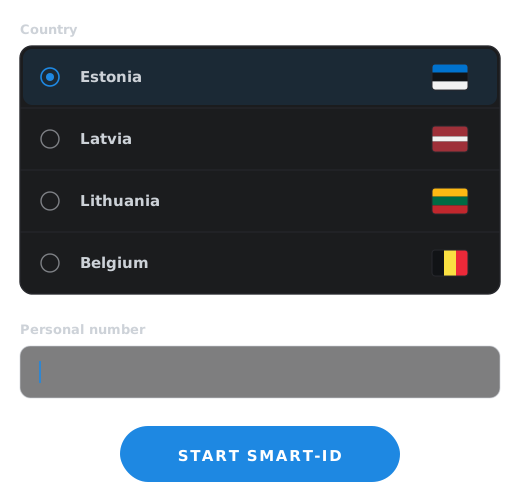
The reference lists the semantics identifier as required, but that doesn't mean you always send it. If you use eID Hub's frontend, it collects the identity from the user: it shows a country picker and a personal number field and builds the semantics identifier for you, so you leave it out of your request. You only supply the semantics identifier yourself when you build your own UI instead of using the frontend.
Verification code
Smart-ID shows the user a four-digit verification code in their app, and the same code must be shown to the user where the transaction started so they can check the two match. This is what protects the user against approving someone else's session. If you use eID Hub's frontend, it displays the code for you. If you don't, you have to show it yourself.
You can also set a short display text, up to 60 characters, which the user sees below the verification code when they're asked for their PIN.
Certificate level
Smart-ID issues either an advanced or a qualified certificate, and eID Hub defaults to qualified. Qualified is the usual choice and is what produces a QES.
Signing
Signing requires the user's semantics identifier, a display text, a certificate level and a digest callback URL. The digest callback is how eID Hub gets the document digest to sign: after the user is identified, eID Hub calls your endpoint with the transaction ID and the full certificate chain, and your endpoint returns the document's id and its base64-encoded digest.
Completion data
On completion you get back the user's given name, surname, personal code and date of birth, their certificate and certificate level, the document number (the personal code plus a suffix identifying the specific device), and for signing the signature. The end result tells you the outcome: a success, or one of several refusal, timeout or unusable-document outcomes.